Staff & Rotas

Teams and sites

Tips from the till, staff records and training, every site in one view, and labour reports for the people allowed to see pay.

Checking a phone at the empty bar Labour report scheduling card All sites scheduling card
Tips & the Till

Tips that follow the sales

Tips attributed from the till or pooled by hours worked, and a till that can wait for a clock-in.

Tips attributed from the sale

Tips taken on the till can be tied to the person who took the sale, because the till and the rota know the same person.

A till that waits for the clock-in

Optional, and off until you switch it on. Staff must be clocked in, or on a break, to use the till.

Guests are never part of the rule

Guest QR orders and bookings are never stopped by the clock-in rule. Only staff using the till are.

Pooled by hours, drafted then finalised

A manager drafts the split by hours worked in the period, checks it and finalises it.

After-hours pub desk and tablet
Staff Records & Training

One person, everything that belongs to them

Job, contracted hours, holiday, kit issued and training with an expiry reminder, on the account they already use.

No second staff list

The employee record sits on the user account they already sign in with. Roles, sites and company sign-in stay as they are.

Kit issued, including the small things

Equipment issued to a person, from tracked assets to fobs and radios that are not assets, sits on their record.

Staff keep their own details current

Staff update their preferred name, phone, emergency contact and usual days. Job title, pay and start date stay with managers.

Leavers leave cleanly

Their tag is revoked, an open clock-in is closed, and the profile lists kit still out and the step to deactivate the account.

Head office sees every site

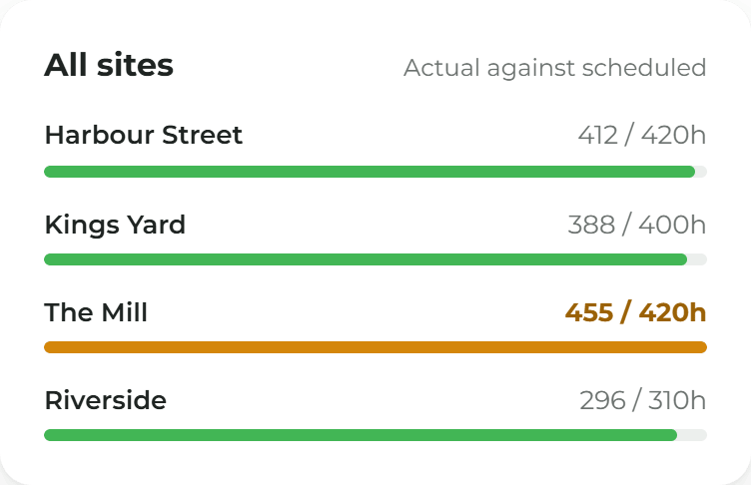
The same screens, with every site in reach, filtered to one site when you need it.

Multi-site Management

Every site, one staff list

Head office sees rotas, hours and leave across the group. A site manager sees their own.

A site manager stays in their site

A site manager sees their own site's rota, hours and leave, and nothing else. The site they sign in to is the boundary.

Hours land where they were worked

Someone based at one site who works a shift at another shows as hours at the site they worked. Head office sees both.

Seeing pay is its own permission

Viewing rotas, approving timesheets, approving leave and seeing pay are separate permissions. Pay stays with head office.

Company sign-in, no second password

If your organisation already uses company sign-in, that is how staff get in. Staff & Rotas adds no new login.

Staff & Rotas, made simple.

Labour Reports

The week's hours, read while you can act

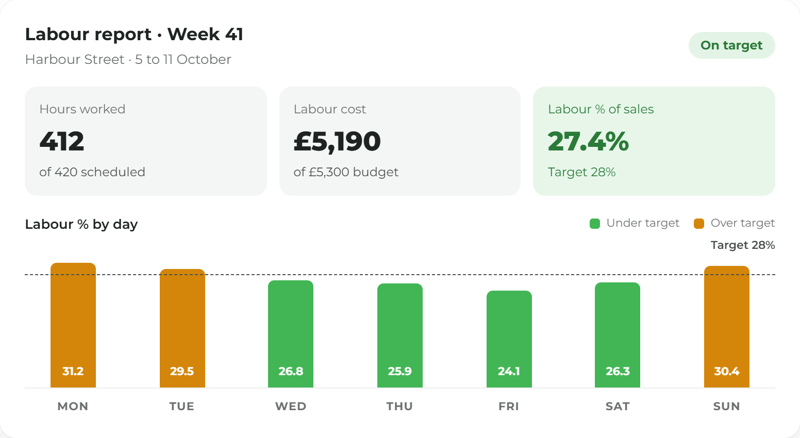
Scheduled against actual, overtime, absence, tips and labour as a share of sales, for the people allowed to see pay.

Labour against sales, for the right people

Labour cost and labour as a share of sales come from the hours and the till. Only people allowed to see pay see the figures.

Absence, leave, cover and tips together

Absence, leave balances, cover for people who were off and tips sit beside the hours, not in another system.

A weekly email, if you want one

A weekly or monthly email sends the figures to the people who read them. Home shows a few figures too.

Ask Mira who was in

Where you use Mira, it answers from your own rota, clock-ins and leave, shows the records behind the answer, and respects who can see pay.

__ minutes
to draft and finalise a week's tip split
__%
of tips attributed to a named person at the till
__
till sales a week made without a clock-in, down from __
__
tip queries raised by staff per period

More ways to use ocapii

Point of sale on a tablet

Point of Sale

The ocapii till, QR ordering and kitchen boards on one platform.

Find out more →
Kitchen porter checks in at the back door

Clocking In

Staff clock in on the phone or the tablet by the door.

Find out more →
Hands holding a lanyard and phone

Timesheets & Payroll

Approve the hours and hand payroll a spreadsheet.

Find out more →
FAQ

Teams and sites: common questions

Tips from sales come from the ocapii till. Pooling by hours uses the hours recorded in Staff & Rotas. Talk to the team about how your site takes tips today.

No. ocapii produces the split. Tax treatment stays with your payroll tool and your advisers.

Staff can update their preferred name, phone, emergency contact and the days they usually work. They cannot change their job title, pay or start date.

No. Staff & Rotas holds a light employee record for time, rotas, leave, training and kit. Contracts and performance reviews stay in your HR process.

No. People keep the account they already use, and their roles control which sites they can open.

No. A site manager sees their own site, and pay is visible only to people allowed to see it.

Only people allowed to see pay. Everyone else sees hours, attendance and absence without wages.

Labour against sales uses sales taken on the ocapii till. Talk to the team about how your sales are recorded today.